Overview of the Settings Page
The Settings page allows you to configure vacs according to your hardware setup and operational preferences.
From here, you can adjust audio devices, volume levels, transmit behavior, key bindings, and various application preferences.
Settings Interface
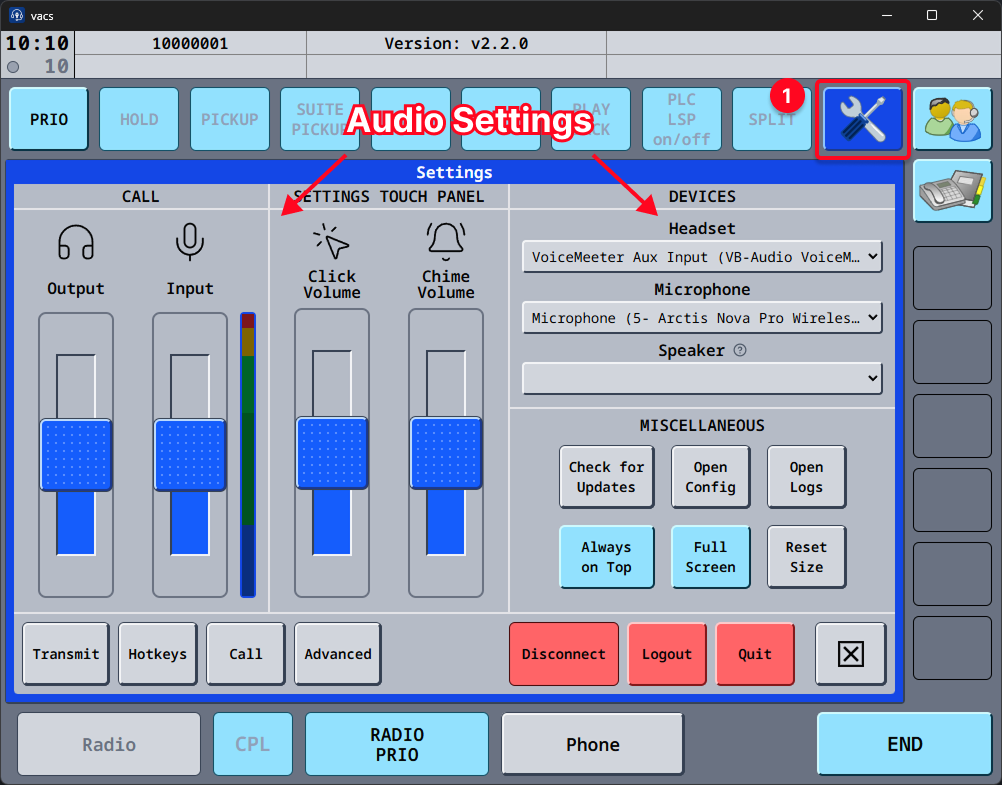
The Settings interface can be accessed via the button marked in yellow in the screenshot above.
It is divided into logical sections that group related configuration options.
It is recommended to configure audio devices and key bindings before starting operational use of vacs to avoid communication issues during live sessions.
Configuration Sections
The following subsections provide detailed explanations of each configuration area:
Audio Settings
Configure:
- Headset / output device
- Microphone / input device
- Speaker / notification device (optional, for ringtone and UI sounds)
- Output and input volume levels
- Notification (chime) and click sounds
→ See Audio Settings
Transmit Modes
Define how vacs handles the transmission behavior:
- Voice Activation
- Push-to-talk
- Push-to-mute
- Radio Integration
→ See Transmit Modes
Hotkeys
Customize:
- Push-to-talk keys
- Transmit priorities
- Call-related shortcuts
- Other operational hotkeys
- Joystick and gamepad buttons, and which devices to ignore while binding
→ See Key Bindings
Call Settings
Defines various call related behaviour and preferences, such as:
- Visual highlights for incoming calls
- Priority calls
- Automatic default call source selection based on current position
- Call sounds
- Always relaying call audio, for setups where a direct connection does not work
→ See Call Settings
Advanced Settings
Allows you to configure more advanced application behavior:
- Remote control (see Remote Control)
- Audio backend
→ See Advanced Settings
Miscellaneous Settings
Control additional application behavior:
- Update checks -Configuration files access
- Log access
- Window behavior
- Interface scaling
→ See Miscellaneous Settings
The following pages describe each section in detail.