Miscellaneous Settings
The Miscellaneous section contains general application controls and system-level functions that do not directly affect audio, calls, or transmission behavior.
These options are located in the lower-right area of the Settings window.
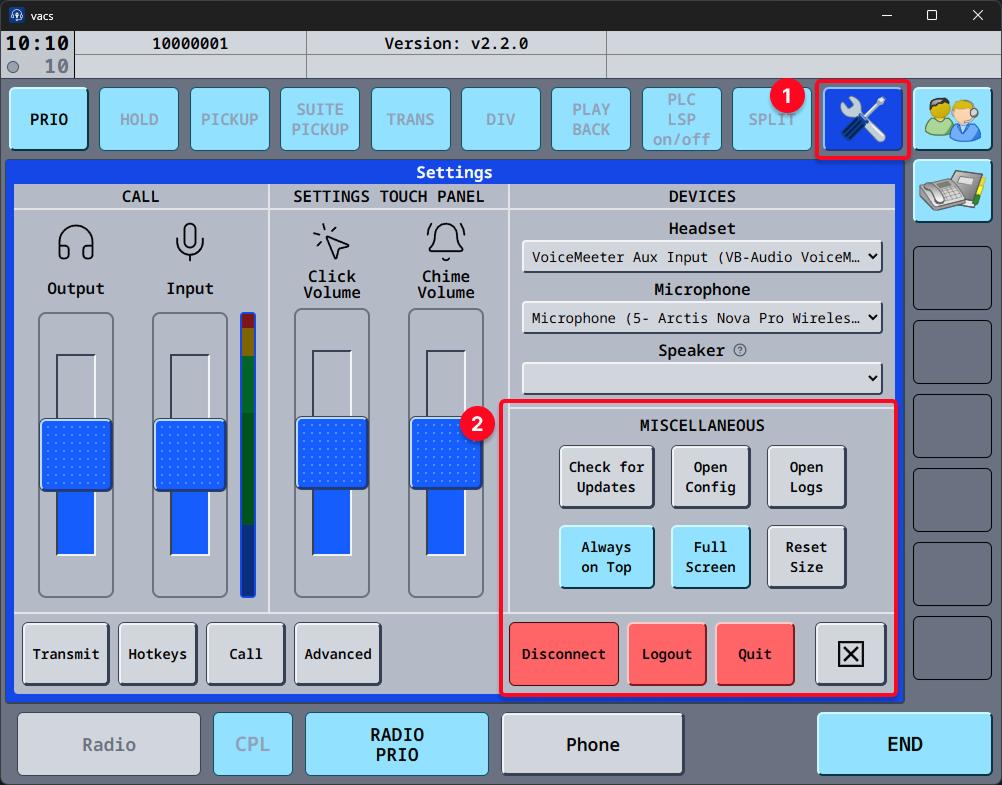
Available Options
The following options are available:
Check for Updates
Checks whether a newer version of vacs is available.
For more information, see the Updating section.
Open Config
Opens the local configuration directory used by vacs.
This directory contains different configuration files for vacs, which should not be modified under normal circumstances. This is primarly intended for testing or troubleshooting purposes.
Open Logs
Opens the log directory containing runtime logs generated by vacs during its use.
Logs can be useful for diagnosing technical issues or reproducing unintended behavior.
If you are asked to provide the logs, this is the location to retrieve them from.
Always on Top
When enabled, the vacs window remains above all other windows.
When disabled, vacs behaves like a normal window.
Full Screen
Switches vacs into full-screen mode.
Reset Size
Restores the application window to its default size.
This is useful if:
- the window was resized unintentionally,
- the layout is no longer scaled properly for your setup.
Session Control Buttons
At the bottom-right of the settings dialog, three session control buttons are available.
These affect your current connection state.
Disconnect
Disconnects an active vacs connection without closing the application.
Logout
Logs you out of your connected VATSIM account within vacs.
After logging out, logging into your VATSIM account will be nessecary, before using vacs again.
Quit
Closes the vacs application entirely.
All active connections will be terminated.