Call Settings
The Call Config Menu allows you to change various call-related settings, customising how calls behave, with options for priority calls, visual highlights, and start/end sound effects.
Opening Call Config
The Call Config Menu can be accessed from the settings page, by clicking the Call button.
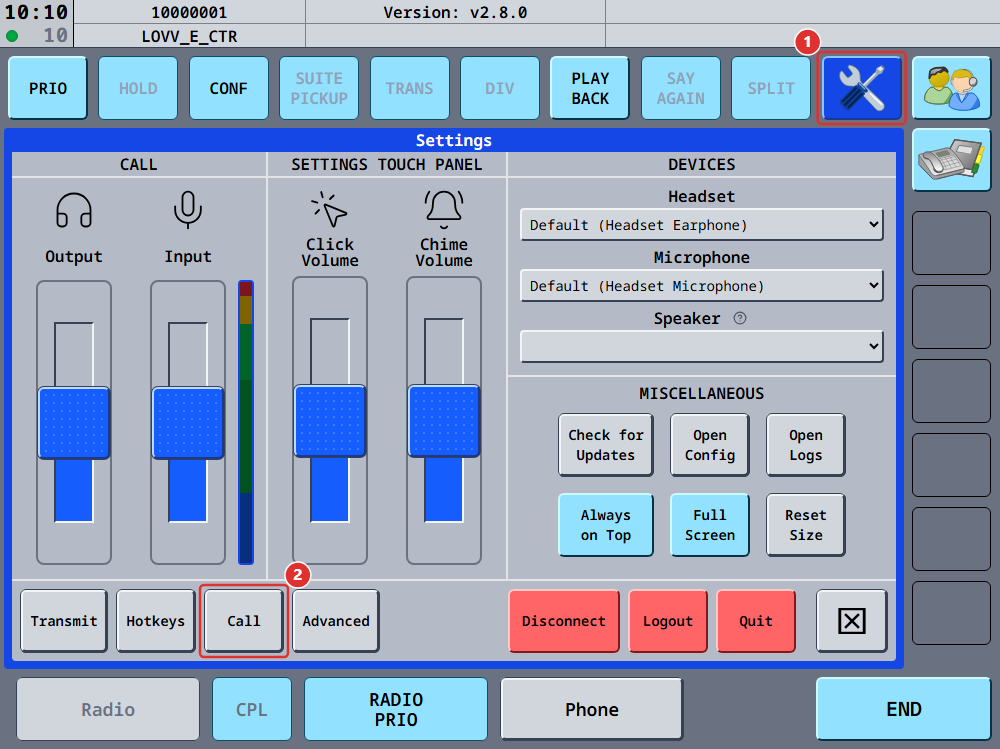
The Call Config page will display the available options, which can be enabled or disabled by the checkbox next to the options. All of them are enabled by default, except Always relay calls. Below the checkboxes, the Ring sounds section lets you replace the built-in chimes with your own sound files.
Available Settings
The following settings are available:
Highlight incoming target
When enabled, the target of an incoming call will be visually highlighted (light green).
Enable priority calls
When enabled, priority calls are accepted.
Priority calls can be distinguished from normal calls by a yellow border visible in the call-sequence, as well as a special sound. They can be initiated by clicking the PRIO button before commencing a call.
Play call start sound
When enabled, a notification sound is played when a call is successfully initiaed. This provide audible confirmation that the call has been successfully established.
When initiating or receiving a call, there is a short delay of approximately 50–200 milliseconds before the call is fully established.
This delay is visually indicated by the orange circle in the top-left corner, which turns green once the connection is active.
If Play Call Start Sound is enabled, this state change is also confirmed audibly.
Play call end sound
When enabled, a notification sound is played when a call ends. This confirms that the call has been terminated.
Automatic default call source
When enabled, vacs automatically sets your default call source based on the position you are logged in with. The first matching station defined in the dataset by your vACC and currently controlled by you is selected. You can still override this manually at any time.
If disabled, no default call source is set automatically and you will need to select one yourself.
Always relay calls
Available from vacs 2.6.0.
When enabled, call audio is always sent through one of our relay servers instead of directly to the other controller. This setting is disabled by default.
Normally vacs sends call audio directly between the two controllers, which keeps latency as low as possible. A relay server is only used when a direct connection cannot be established. Turning this setting on skips the direct attempt entirely and always uses the relay.
You should only enable this if you regularly have trouble hearing the other controller. See One-way audio for when that applies and what vacs already does about it on its own.
This setting only affects your client. It does not require anything of the controller you are calling, and it works regardless of which version they are running.
Relaying adds a detour through our server, so calls connect and carry audio slightly slower than a direct connection. The difference is small and usually not noticeable in conversation, but there is no reason to leave this on if your calls work fine without it.
The relay servers are run by the vacs core maintainers, and relayed audio is not recorded or stored. See About the relay servers, our Privacy Policy and our Terms of Use.
Ring sounds
Available from vacs 2.8.0.
By default, an incoming call plays a short built-in chime, and a priority call plays a more urgent one. The Ring sounds section at the bottom of the Call Config page lets you replace either of them with a sound file of your own, for example the ringing tone you are used to from the real system at your unit.
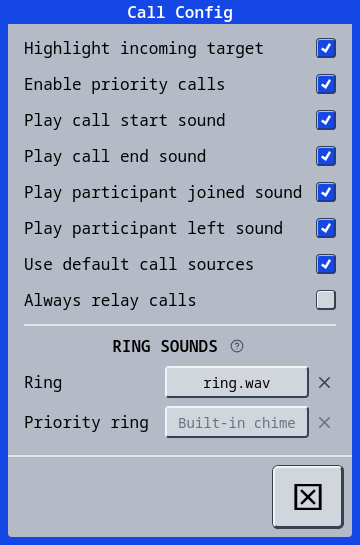
Each ring has a field that reads Built-in chime or the name of the chosen file, with an X next to it, the same controls as a hotkey.
- Click the field to open a file dialog and pick a
.wavfile. vacs plays it once so you can check it. - Click the X to go back to the built-in chime for that ring. It plays once as confirmation.
- Hover the field to see the full path.
The Priority ring field is only available while Enable priority calls is on, since a priority call is the only thing that plays it.
The file has to be a WAV file between 0.1 and 30 seconds long. Other formats such as MP3 are not supported. Mono or stereo, and any common sample rate, are fine: vacs converts the file to what your output device needs. If a file cannot be used, vacs tells you why and keeps the previous sound.
The sound plays once per incoming call, through the speaker device when one is configured and otherwise through your headset, and it stops as soon as you pick up. vacs levels every custom file to the loudness of the built-in chime, so the Chime Volume slider means the same thing whichever sound is set, and releasing that slider plays the current ring sound as well.
vacs remembers the path of the file, not its contents. If you move or delete the file, vacs plays the built-in chime from the next start on, and the Call Config page shows the file name in red until you pick a file again or press the X.
Choosing a file is only possible in the desktop client, because the file dialog opens there. A remote control session shows the current sounds and can reset them to the built-in chime.