Installation
vacs is available for Windows, Linux and macOS.
Before installing vacs, verify that your system meets the requirements described in the Requirements section.
Follow the steps below to download and install the latest version.
Windows
Downloading vacs
To install vacs on Windows, follow the instructions below:
- Visit the GitHub Releases page of vacs.
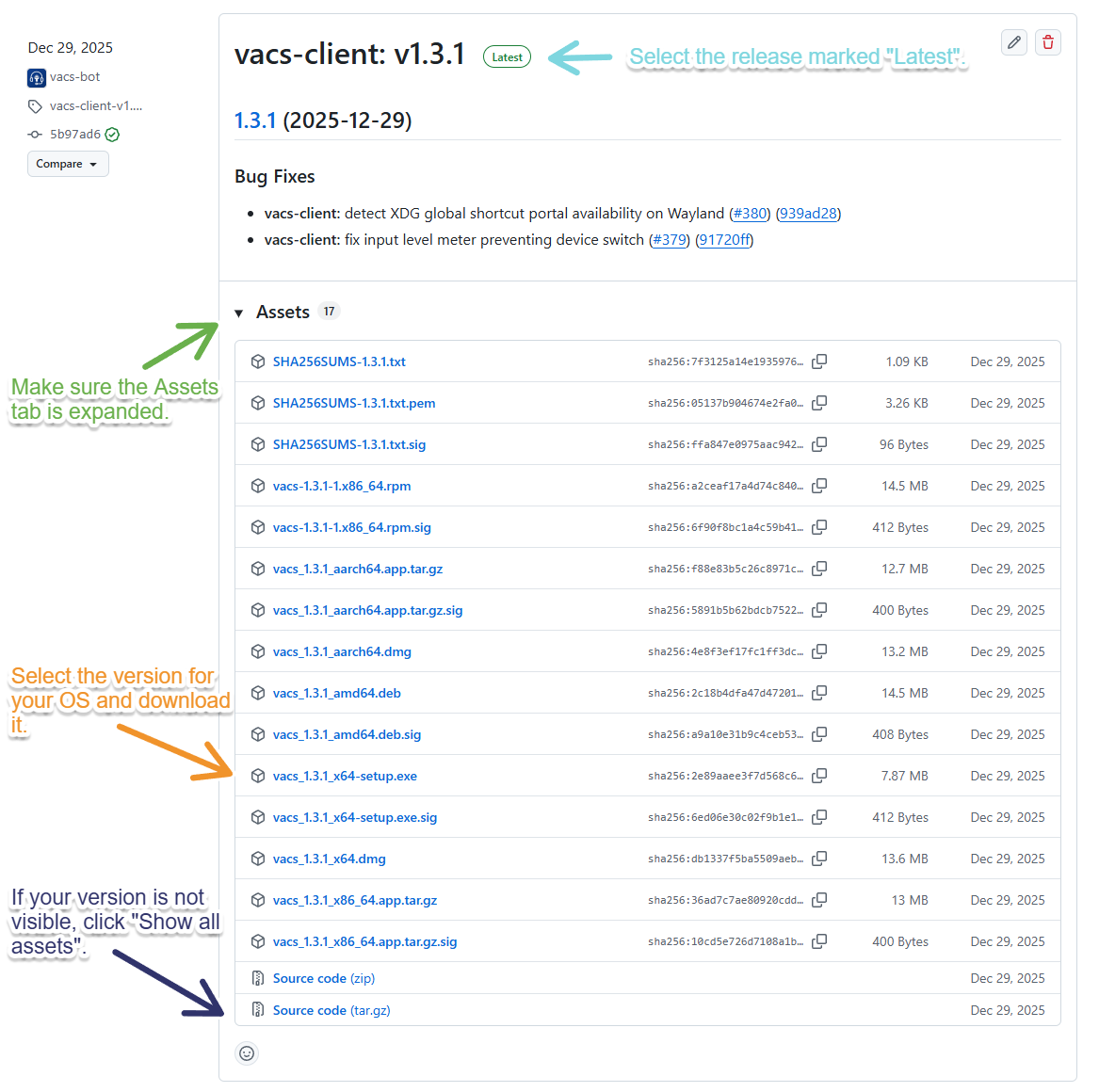
- To download the latest stable version of vacs, find the release marked Latest.
- If not already done, expand the Assets Tab.
- Download the correct installer for your system. For Windows, this file has the ending
_x64-setup.exe.
If you don’t see your file, click Show all assets to display the complete list.
Installing vacs
Once you have downloaded the Installer, the installation process is straight-forward:
- Open the installer.
- Follow the on-screen instructions to install vacs.
- Launch vacs after the installation completes.
You can update vacs later using the built-in updater. See the Updating section for details.
Linux
Downloading vacs
To install vacs on Linux, follow the instructions below:
- Visit the GitHub Releases page of vacs.
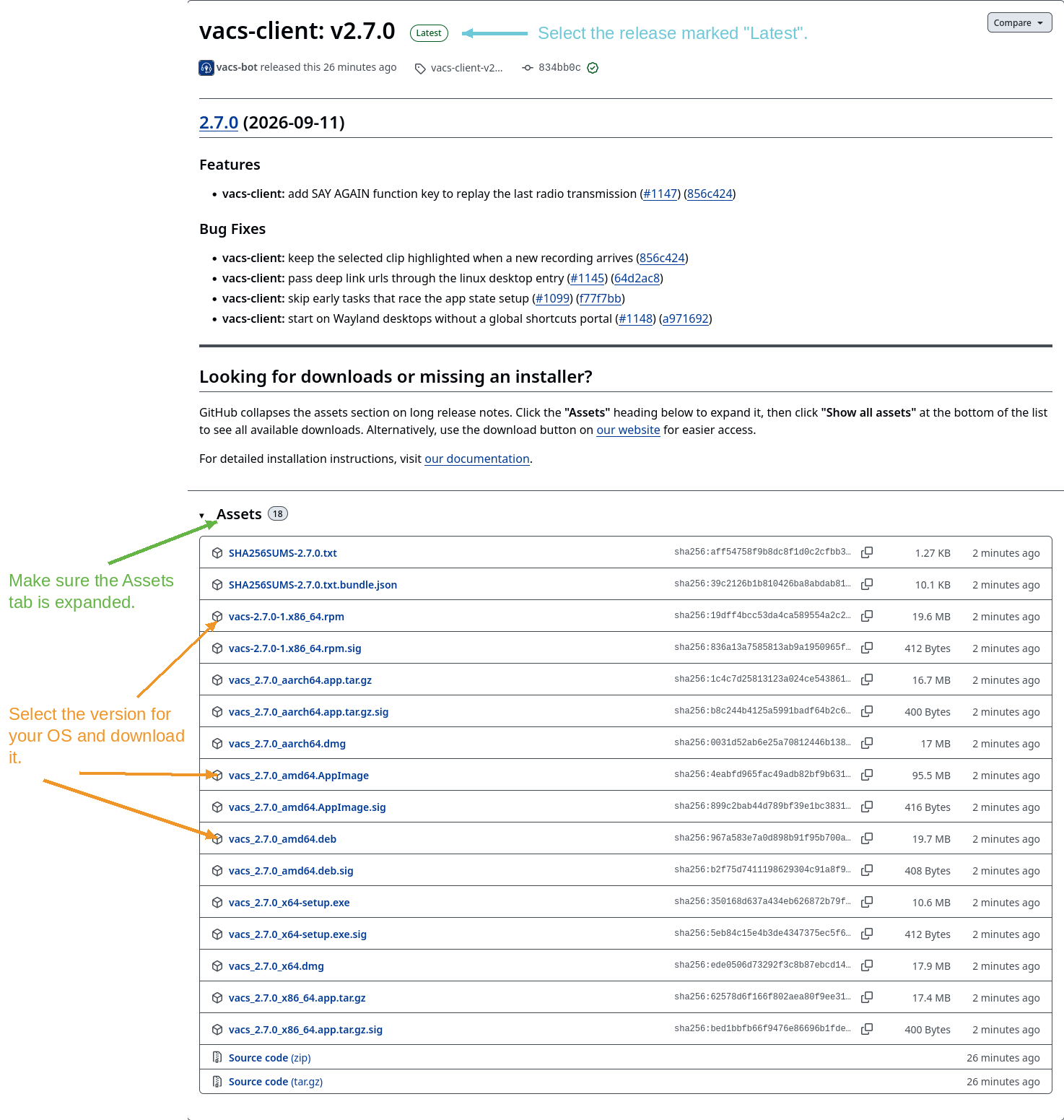
- To download the latest stable version of vacs, find the release marked Latest.
- If not already done, expand the Assets Tab.
- Download the correct file for your system. For Linux, there are three options:
_amd64.deb- for Debian, Ubuntu, Linux Mint and other Debian-based distributionsx86_64.rpm- for Fedora, openSUSE, RHEL and other Red Hat-based distributions_amd64.AppImage- for any other distribution, or if you would rather not install anything system-wide
If your distribution is Debian- or Red Hat-based, prefer the .deb or .rpm. They are considerably
smaller, because they share the system's existing libraries instead of shipping their own copies.
Pick the AppImage if neither package fits your distribution.
If you don’t see your file, click Show all assets to display the complete list.
Installing vacs
How you install vacs depends on which file you downloaded.
Debian package (.deb)
Double-click the file to open it in your desktop's software installer, or install it from a terminal:
sudo apt install ./vacs_<version>_amd64.deb
Your package manager pulls in the system libraries vacs needs. Once it finishes, vacs appears in your application menu.
RPM package (.rpm)
Double-click the file to open it in your desktop's software installer, or install it from a terminal:
sudo dnf install ./vacs-<version>-1.x86_64.rpm
As with the Debian package, dependencies are handled for you and vacs appears in your application menu afterwards.
AppImage
An AppImage is a single self-contained file - there is nothing to install. Mark it as executable and run it:
chmod +x vacs_<version>_amd64.AppImage
./vacs_<version>_amd64.AppImage
You can move it anywhere you like, for example ~/Applications. Because the AppImage carries its own
copies of the libraries vacs needs, it is a much larger download than the .deb or .rpm, and it
does not add itself to your application menu on its own. Tools such as
Gear Lever or
AppImageLauncher can do that for you if you want
a menu entry.
On a Wayland desktop, vacs registers its push-to-talk and other global shortcuts with the desktop
portal, and the portal has to know which application is asking. A packaged vacs is recognized by its
menu entry. When you start the AppImage by double-clicking it in a file manager, vacs identifies
itself to the portal instead, which requires xdg-desktop-portal 1.22 or newer. On an older system
vacs starts normally, but its keyboard shortcuts do not work; start it from a terminal instead, or add
a menu entry with one of the tools above and launch it from the menu.
Some minimal distributions do not ship FUSE, which AppImages use to mount themselves. If the
AppImage refuses to start with a FUSE-related message, install your distribution's fuse package,
or run it once with ./vacs_<version>_amd64.AppImage --appimage-extract-and-run.
You can update vacs later using the built-in updater. See the Updating section for details.
macOS
Downloading vacs
To install vacs on macOS, follow the instructions below:
- Visit the GitHub Releases page of vacs.
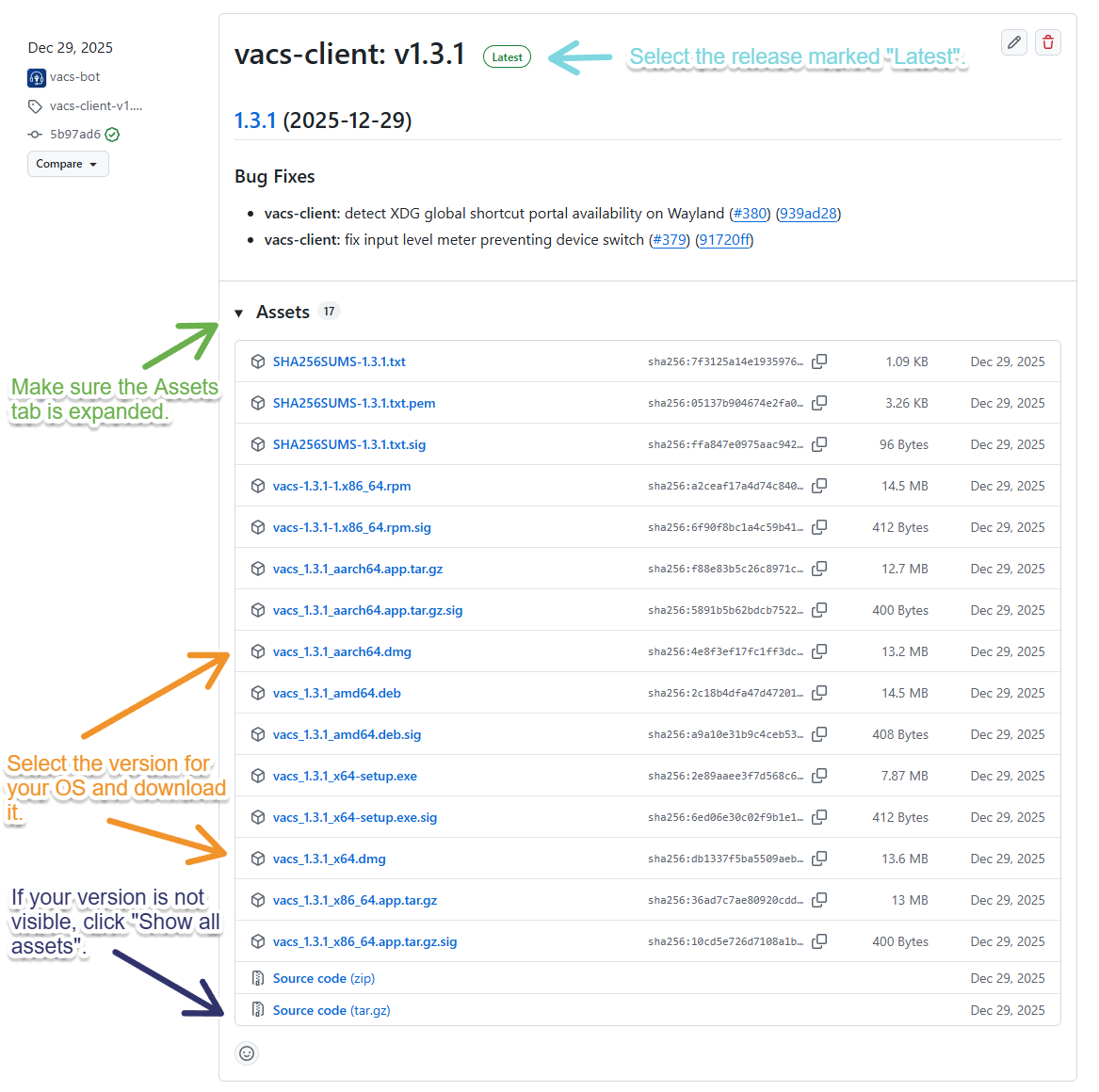
- To download the latest stable version of vacs, find the release marked Latest.
- If not already done, expand the Assets Tab.
- Download the correct installer for your system. For macOS, this file has the ending
_x64.dmg(Apple Intel) or_aarch64.dmg(Apple Silicon).
If you don’t see your file, click Show all assets to display the complete list.
Installing vacs
In Progress.
Our macOS releases are currently not code signed and may therefore be automatically flagged as "corrupted" by macOS.
To run the application, remove it from quarantine by executing the following command in the Terminal Application:
sudo xattr -rd com.apple.quarantine /Applications/vacs.app
You can update vacs later using the built-in updater. See the Updating section for details.